FLYING CAR AI
中文Start creating

Flying Car AI
Video Generator

One photo. An impossible stunt. Upload your subject and let the template handle the motion — no prompt needed.

One clear photo. Keep the whole subject in frame.
Single purchase
$4.99
Length
15 seconds
Output
720P · silent

Source aspect ratio. Queue and rendering times vary and may exceed 15 minutes. Check your saved task in My videos.

Sign in to view your credits

Full pricing and delivery details

1 credit per video. No subscription. A confirmed failed task returns 1 credit; success is not a guarantee of identical likeness.

Add a photo to start.

Use a photo you own or have permission to edit. Your photo stays private.

Result videoRamp stuntReal 720P result · 15 seconds

Use one clear photo of the whole subject. For a rider, include the rider and mount together; for a vehicle, keep its roof and wheels visible.

Upload a photoGenerateDownload & share

One photo. A real generated result.

Each exact input photo is paired with the video it actually produced. These are completed studio tests, not promised copies of your future result.

Silver car — same ramp, new vehicle

An earlier 15-second 480P test replaced the moving van with this car while retaining the arena and stunt sequence. New paid orders request native 720P.

Exact silver car input photo retrieved from the completed test
Actual input photo
Actual result · 15 seconds · original 480P test

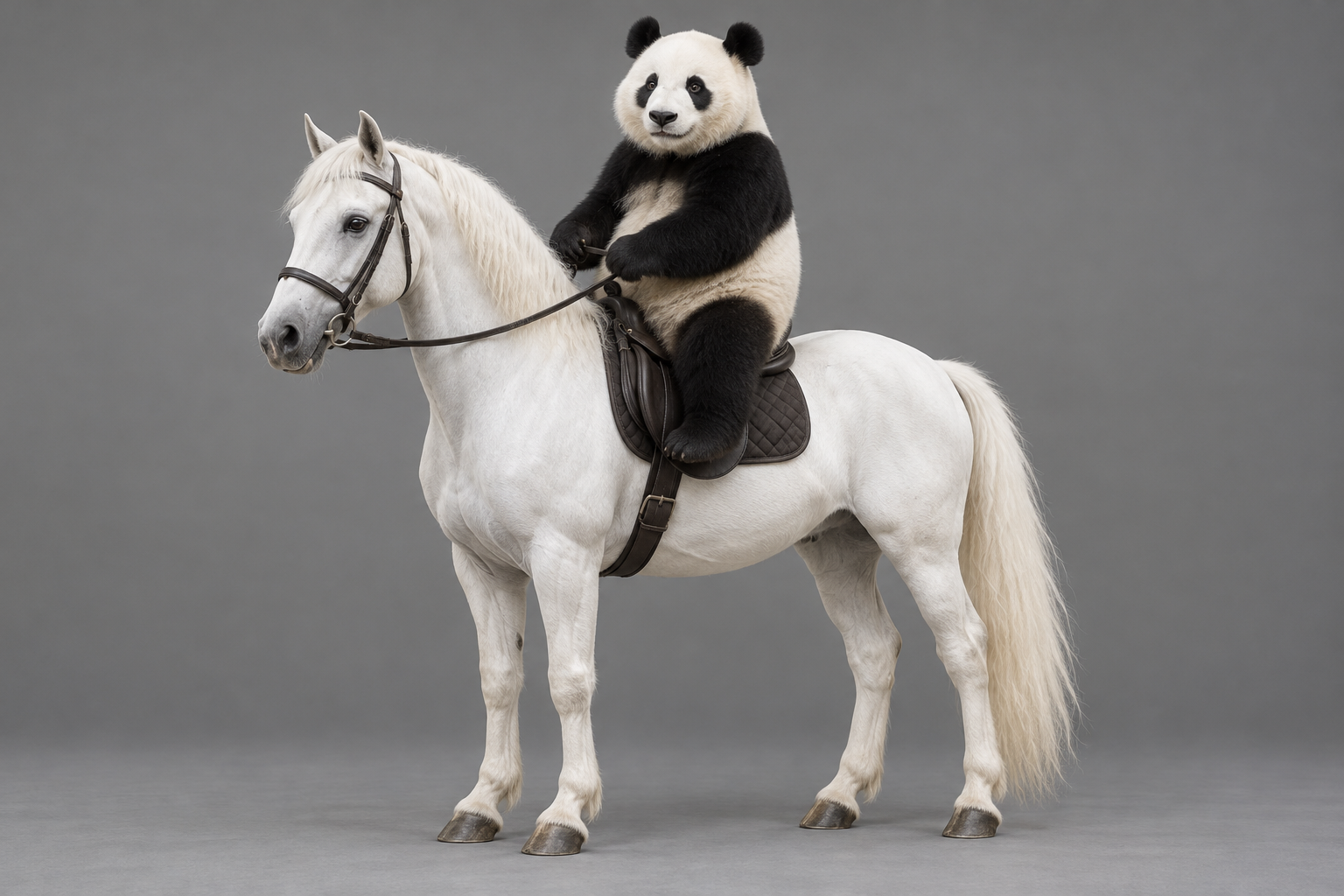
Panda riding a white horse

The panda and horse replace the complete moving subject through the same ramp stunt. This completed 720P model test is 1112 × 828, 15 seconds and silent, matching the paid workflow. Results vary.

Actual input photo: a panda riding a complete white horse
Input photo used for this video
Panda riding a white horse · 15-second result · native 720P tier

See the ramp workflow ↗

Choose how it flies.

Start with the paid Ramp stunt. Other flying scenes and rider stunts are visual references.

More visual references (8)

One photo is all you need.

  1. Choose a template

    Start with the paid Ramp stunt. Other gallery scenes are references only.

  2. Add your subject

    Upload a clear photo of the whole subject. No prompt or reference video to prepare.

  3. Generate your video

    Choose a video pack, check its total, then confirm generation. Each 720P, 15-second video uses one credit. Completed tasks have private playback and download.

ROADSTER EXPLAINED

Real Roadster footage or an AI edit?

Understand the October 2026 demonstration, then check the source of the specific clip you are watching.

Read the explainer

Get more from your photo.

Photo tips, motion examples and answers about Flying Roadster AI.

Flying Roadster AI: plan a car-to-flight video

Explore Flying Roadster AI video templates, prepare one subject photo and compare ramp and airborne-roll effects.

How to prepare a car photo for an AI flight scene

Choose a clear car reference, check framing and remove ambiguity before planning a flying car AI scene with a local image preview.

Flying car AI prompts: subject, action and camera

Write a focused flying car AI prompt with a reference subject, a simple flight action, stable camera direction and clear limits.

Storyboard a flying car takeoff and landing

Break an ambitious flying car sequence into an approach, an airborne moment and a landing, with continuity checks for each shot.

Keep the same car throughout an AI video

Check roofline, paint, wheels and body details in a flying car video, then simplify the scene when the reference vehicle changes.

Portrait or landscape for a flying car video?

Compare 9:16, 16:9 and square compositions for car takeoff and flight, and plan enough space for wheels, road and sky.

Light a night flying car AI scene clearly

Plan readable night-flight lighting with a clear vehicle silhouette, restrained reflections and a ground shadow that shows the lift.

Fix a flying car AI video brief before retrying

Diagnose changing wheels, sliding cars, unstable cameras and missing landings, then adjust one part of a flying car video brief.

Is the Tesla Flying Roadster Real or AI?

Understand the October 2026 Tesla Roadster demonstration, distinguish source footage from AI car edits, and check a flying-car clip before sharing.

Before your first flight.

How do I make a Flying Car AI video?

Choose Ramp stunt, add one complete subject photo, sign in with Google and choose a 1-, 3- or 10-video pack. Each video uses one credit. Confirm generation for a 15-second native 720P silent output. No prompt is needed.

What can be in my photo?

Prepare a car, rider, bicycle, carriage or skateboard subject for its matching template. Keep the complete subject and connected parts visible rather than uploading a cropped face.

Do I need to upload a reference video?

No. Each template already has its own result video. You only choose your subject photo.

Is a result video my generated video?

No. Result videos illustrate the template motion. Your own video appears in the Your video area only after a real generation task completes.

What should I do if generation fails?

Login, missing credit and task failure have separate actions. A server-confirmed failed task returns one credit. Unknown submissions remain under review; do not purchase or submit again. A completed result is not automatically refunded for a subjective quality preference. Contact support for billing errors.

The road is just
the beginning.

Choose your scene. Bring your car. Give your next idea a little altitude.
Build your scene